Don't Touch My Phone Alarm App1.2.5
Publisher Description



Dont touch my phone is Antitheft app to keep phone safe from intruders and thief
Don't Touch My Phone App - Antitheft Phone Alarm
Want to secure your phone? Or avoid losing your phone in crowded areas? Here is the mobile security application to save your phone from theft. Don't Touch My Phone antitheft app dtmp includes the intruder selfie capturing, anti pocket alarm, and unplug charger alarm to secure your phone from unauthorized activity.
DTMP don't Touch My Phone antitheft app will help you to secure your android device. Online and offline don't touch my phone have an earphone alarm when the headset is plugged in or out, If you are seeking a phone security application to safeguard your device from unauthorized access or theft. Get our Don't Touch My Phone, its an antitheft app designed to ensure the safety of your phone.
Don't Touch My Phone antitheft app will work as anti phone theft alarm technology, Dont touch phone app or find a lost phone app can identify an individual who is attempting to steal your phone. The touch phone alarm will blow or take a selfie of the invader/thief to save phone. The touch phone alarm sound and intruders alert will protect against intruders in our Don't Touch My Phone app.
Feature of this Don't Touch Phone Alarm Antitheft App:
- Intruder Selfie of Theif with Antitheft Alarm
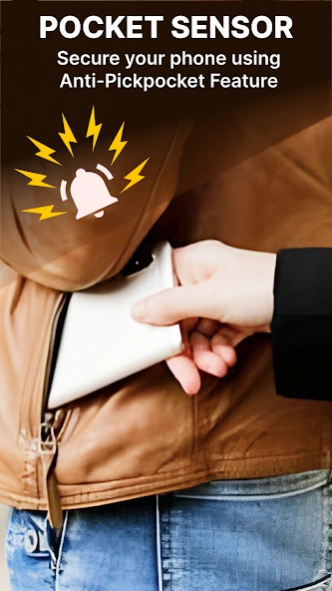
- Anti Pocket Alarm to Save phone from pickpocket
- Unplug charger alarm while charging
- Earphone Alarm Connect/Disconnect Headset
- Motion Detector Alarm with Stolen phone finder
- Battery Full Alarm to Save phone from over charging
- Wifi turn On/Off Alarm
- Simple Find Lost Phone App
- Dont touch my phone antitheft app for all ages
- Secure Phone with Loud Phone Alarm Alert
Our Don’t Touch My Phone, Find Lost Phone app is the end of your worries. Antitheft stolen phone app locate my device is a simple yet useful application that allows you to be carefree and protect your phone against invaders by taking selfie and sound alert.
We all carry our personal lives and important documents on our smartphones or tablets. One moment of carelessness and we lose everything means the PHONE. Find your phone with anti phone theft alarm locate my phone app and avoid losing your mobile devices. Lost phone finder is the best dont touch my phone app to protect your android device.
Our anti pickpocket or lost phone finder app is the solution to protect your phone from unauthorized use and thieve. You have found the right secure phone app! Don't Touch My Phone is an antitheft alarm mobile security app made to protect your phone in all aspects.
This dont touch my phone or stolen phone app uses anti phone theft alarm technology to detect if someone tries to steal your phone. You can relax knowing your phone is protected by the Don’t Touch My Phone Anti Theft app with an alarm sound and a warning for intruders. Protect your phone and save your phone from theft with the Don't Touch My Phone alarm.
About Don't Touch My Phone Alarm App
The company that develops Don't Touch My Phone Alarm App is Sky Skraper. The latest version released by its developer is 1.2.5.
To install Don't Touch My Phone Alarm App on your Android device, just click the green Continue To App button above to start the installation process. The app is listed on our website since 2026-10-01 and was downloaded 8 times. We have already checked if the download link is safe, however for your own protection we recommend that you scan the downloaded app with your antivirus. Your antivirus may detect the Don't Touch My Phone Alarm App as malware as malware if the download link to com.wtmp.antitheft.donttouchmyphone.unlock is broken.
How to install Don't Touch My Phone Alarm App on your Android device:
- Click on the Continue To App button on our website. This will redirect you to Google Play.
- Once the Don't Touch My Phone Alarm App is shown in the Google Play listing of your Android device, you can start its download and installation. Tap on the Install button located below the search bar and to the right of the app icon.
- A pop-up window with the permissions required by Don't Touch My Phone Alarm App will be shown. Click on Accept to continue the process.
- Don't Touch My Phone Alarm App will be downloaded onto your device, displaying a progress. Once the download completes, the installation will start and you'll get a notification after the installation is finished.
Program Details
System requirements
Download information
Pricing
Version History
version 1.2.5
posted on 2026-10-01
- Who Unlock My Phone
- Anti theft Alarm with don't touch my phone
- Over charging notification
- Charging removal notification
- Selfie intruder who unlock my phone
- Touch sensor alert of pocket sense thief detection
- Motion pocket alarm
- Anti-theft alarm phone protection
- Bug fixes
- App performance improvements
version 1.2.0
posted on 2025-02-24
Who Unlock My Phone
Anti theft Alarm with don't touch my phone
Over charging notification
Charging removal notification
Selfie intruder who unlock my phone
Touch sensor alert of pocket sense thief detection
Motion alarm
Anti-theft alarm phone protection
Bug fixes
App performance improvements
